Install
From the KODI Main Menu, navigate to Settings (cog at top).

Navigate to "System"

Make sure "Add-ons > Unknown Sources" is Enabled.
Note:
Select "Yes" at the warning when enabling

Navigate back to "Settings > File manager"

Select "Add source".
Select "<None>" and type in https://slyguy.uk/
Select "OK".
Move down and enter "SlyGuy" as the source name.
Move down and select "OK".

Go back to System menu
Select Add-ons
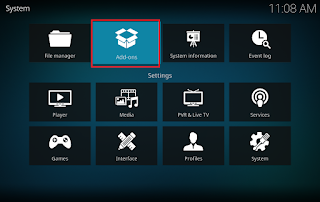
Select "Install from zip file"
Select "SlyGuy" in the list.
Finally select the "repository.slyguy.zip" file.

The repository will download and install.
